
Automatic Editor-Author Restricting
Do any of your journal's editors also submit manuscripts to the journal as authors? If so, you can use automatic editor-author restricting to help manage potential conflicts of interest. When enabled, this feature automatically ensure that an editor's editor-level access is restricted from manuscripts where their email address appears among the listed authors — helping ensure editors don't have visibility into the review process for their own submissions.
- What is automatic editor-author restricting?
- How to enable automatic editor-author restricting
- When are editors automatically restricted from editor-level access of their manuscripts?
- How to identify editors who are also authors
- FAQs
What is automatic editor-author restricting?
Automatic editor-author blinding is an optional peer review setting that automatically revokes an editor's access to a manuscript when their email address matches any author (including co-authors) listed on that manuscript. This prevents the editor from viewing the manuscript in their editor dashboard, manuscript table, accessing the Manuscript Work Area, or participating in editorial decisions or Discussions for that submission.
This feature is separate from the journal's peer review blindness setting (single blind vs. double blind), which controls whether reviewers and authors can see each other's identities. Automatic editor-author restricting specifically controls whether editors can see manuscripts they have authored.
How to enable automatic editor-author restricting
- The admin editor will navigate to Peer Review Settings → Manuscript Blindness.
- Check the box labeled Automatically restrict editors from their own manuscript submissions.
- Click Update Journal.
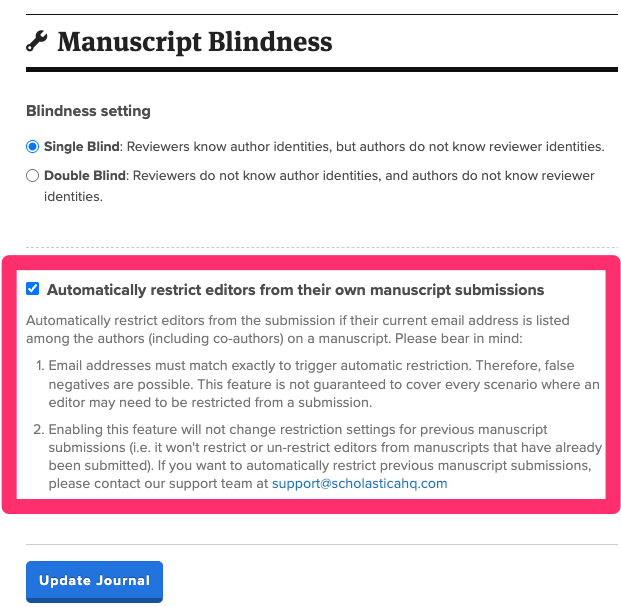
To disable the feature, uncheck the box and click Update Journal.
Please note: Disabling the feature will not automatically restore access for editors who were previously restricted from their authored manuscripts. If you want them to have editor-level access to those manuscripts, you will need to manually re-grant access from the Manuscript Work Area.
When are editors automatically restricted from editor-level access of their manuscripts?
Once enabled, automatic editor-author restriction is triggered in three scenarios:
- When a manuscript is submitted. If any author's email address on the submitted manuscript matches an editor's email address, that editor is automatically restricted from the manuscript.
- When an editor accepts an invitation. If a newly invited editor's email address matches any author on an existing manuscript in the journal, they are automatically restricted from those manuscripts upon accepting the editor invitation.
- When an editor confirms a new email address. If an editor changes the email address on their Scholastica account, and their new email matches an author on any manuscript in the journal, they are automatically restricted from those manuscripts after confirming the email change.
How to identify editors who are also authors
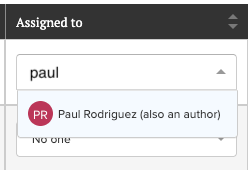
In the Manuscript Work Area, the Assigned editor dropdown shows an (also an author) label next to any editor whose email address matches an author on that manuscript. This label appears regardless of whether automatic editor-author restricting is enabled, and can help you identify potential conflicts of interest when assigning editors.
FAQs
How does the email matching work?
The feature compares the editor's current Scholastica account email address against the email addresses listed for all authors (including co-authors) on a manuscript. Email addresses must match exactly — there is no fuzzy matching or name-based matching. This means false negatives are possible if, for example, an editor uses a different email address for their Scholastica account than the one listed on their manuscript submission (e.g. their editor account is under ellen@editor.com but their co-author information lists their email address as ellen.yeager@editor.com.)
Will enabling this feature restrict editors from manuscripts that have already been submitted?
No. Enabling automatic editor-author restricting only affects manuscripts going forward. It will not retroactively restrict or un-restrict editors from manuscripts that were submitted before the feature was enabled. If you need to automatically restrict editors from historical manuscript submissions, please contact our support team at support@scholasticahq.com.
Can an editor who was automatically restricted be re-granted access?
Yes. Another editor can manually re-grant access to a restricted editor from the Manuscript Work Area. A manual access grant will override the automatic restricting for that specific manuscript. However, if a new manuscript is submitted in the future where the editor is listed as an author, they will be automatically restricted from that new manuscript as well.
Does this feature affect an editor's ability to submit manuscripts to the journal?
No. Editors can still submit manuscripts to the journal as usual. The feature only affects their editorial access — it revokes their ability to view and manage the manuscript from the editor side.
Is this feature enabled by default for new journals?
Yes, automatic editor-author blinding is enabled by default for newly created journals. Existing journals will need to enable it manually from the Manuscript Blindness settings page.